




| << Discussione precedente | Discussione successiva >> |
 [Released] X-Unison 2.27.57_rev_1_test_1 [Released] X-Unison 2.27.57_rev_1_test_1 |
| Autore | Messaggio |
| pir |
| ||
   Utente registrato #2110 Registrato il: gio 01 feb 2007 - 20:42Provenienza: France Messaggi: 14 | Please find hereafter the first test release version of X-Unison (Unison home page) Second TEST Version (6.980.705 Byte/6,7 Mo) http://zhutuzi.free.fr/files/X-Unison_2.27.57_rev_1_test_2.zip Some Portalisation notes - Unison preferences files are found according to UNISON environment variable (You can also use the HOME environment variable but I personally prefer to keep it pointing to my Documents folder). - Unison preferences files are to be adapted to reflect the current winpenpack drive letter. I use for that a custom AutoIt udf that perform this task (you can find it in the src folder). I personally don't encourage you as using the existing FixDriveLetter directive from X-launcher 1.4 as it might break you preference file: X-launcher function does replace all drive letter so that it will certainly also alter other root directive in your preference files. - Unison log file is created by default in the HOME directory. I have use the "-logfiles" directive to save it in the User\Unison folder to keep it separated from my Documents. This of course can be adapted to your personnal preference. - Unison relies on GTK library. GTK library is refer to by adding to the PATH the GTK/bin location I also perform a copy of GTK/etc content to User/gtk in order to keep the gtk configuration centralized and potentially share it with other GTK apps. [Edited 2010.01.29] Second test release according to Danix comments (see bellow) [ Modificato sab 06 feb 2010 - 12:17 ] | ||
| Torna ad inizio pagina |
|


| Danix |
| ||
   Utente registrato #1 Registrato il: ven 29 dic 2006 - 05:38Provenienza: Sassari Messaggi: 12956  | Hello pir, - Unison log file is created by default in the HOME directory. I have use the "-logfiles" directive to save it in the User\Unison folder to keep it separated from my Documents. This of course can be adapted to your personnal preference. I think it is better to change it to:
Parameters=-logfile "$Home$\$AppName$\unison.log"
Otherwise, in paths with spaces an error is shown: 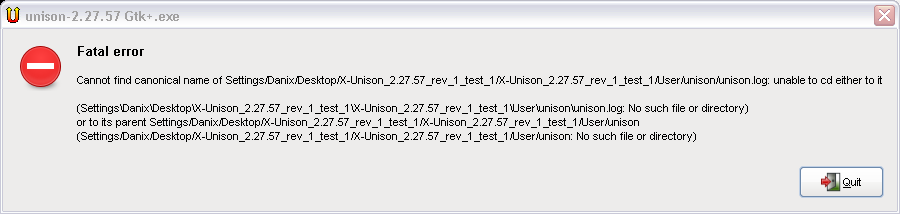 I'd like to ask you about this part:
FixDriveLetter=%UNISON%\Portable_EDF.prf
What are these files (Portable_EDF.prf and Zhendows.prf)? - Unison relies on GTK library. GTK library is refer to by: . adding to the PATH the GTK/bin location . modifying GTK_EXE_PREFIX (and DATA_PREFIX) to GTK/ directory I changed the GTK code with:
; GTK library location
I also perform a copy of GTK/etc content to User/gtk in order to keep the gtk configuration centralized and potentially share it with other GTK apps. To install a gtk configuration, is not enough to copy the preconfigured files only once? For example:
;Install GTK configuration files
| ||
| Torna ad inizio pagina |
|
| pir |
| ||
Utente registrato #2110 Registrato il: gio 01 feb 2007 - 20:42Provenienza: France Messaggi: 14 | Hello Danix, Thanks for your quick feedback Danix ha scritto ... - Unison log file is created by default in the HOME directory. I have use the "-logfiles" directive to save it in the User\Unison folder to keep it separated from my Documents. This of course can be adapted to your personnal preference. I think it is better to change it to:
Parameters=-logfile "$Home$\$AppName$\unison.log"
Otherwise, in paths with spaces an error is shown: I update it in the next test relaese Danix ha scritto ... I'd like to ask you about this part:
FixDriveLetter=%UNISON%\Portable_EDF.prf
What are these files (Portable_EDF.prf and Zhendows.prf)? These two files are unison preference files that I use. These files contain directive to tell unison what to synchronize, therefore they usually contain reference to the USB drive letter from which X-Unison is launched. They defintly need to go through FixDriveLetter to be used. I include them in the ini only for example to show how to fix the drive letter. This INI part shall be adapted to your use to fit your config. Possibly, it would be better to comment out this part in the default ini ? An alternative could be to run FixDriveLetter to $Home$\$AppName$\*.prf but at the moment the use of wildcards is not supported by x-udf.au3. Danix ha scritto ... - Unison relies on GTK library. GTK library is refer to by: . adding to the PATH the GTK/bin location . modifying GTK_EXE_PREFIX (and DATA_PREFIX) to GTK/ directory I changed the GTK code with:
; GTK library location
OK. No problem for me. Just to understand, why not keep %PATH%;$Lib$\GTK\bin and GTK_EXE_PREFIX ? Danix ha scritto ... I also perform a copy of GTK/etc content to User/gtk in order to keep the gtk configuration centralized and potentially share it with other GTK apps. To install a gtk configuration, is not enough to copy the preconfigured files only once? For example:
;Install GTK configuration files
Yes, you're rigth. The RunAfter entry is of no use. | ||
| Torna ad inizio pagina |
|
| Danix |
| ||
Utente registrato #1 Registrato il: ven 29 dic 2006 - 05:38Provenienza: Sassari Messaggi: 12956 | Danix ha scritto ... I'd like to ask you about this part:
FixDriveLetter=%UNISON%\Portable_EDF.prf
What are these files (Portable_EDF.prf and Zhendows.prf)? These two files are unison preference files that I use. These files contain directive to tell unison what to synchronize, therefore they usually contain reference to the USB drive letter from which X-Unison is launched. They defintly need to go through FixDriveLetter to be used. I include them in the ini only for example to show how to fix the drive letter. This INI part shall be adapted to your use to fit your config. Not sure I understand, but the new "_WriteWinPenPackDriveLetterToFile()" and "_NeutralizeWinPenPackDriveLetterInFile()" functions fix all paths of recent folders? Or they change only the drive letter? Maybe can be usefull if you could post these files (deleting your eventual personal data, for privacy). OK. No problem for me. Just to understand, why not keep %PATH%;$Lib$\GTK\bin and GTK_EXE_PREFIX ? Why keep them if not necessary?  At least, for what I've noticed.. | ||
| Torna ad inizio pagina |
|
| pir |
| ||
Utente registrato #2110 Registrato il: gio 01 feb 2007 - 20:42Provenienza: France Messaggi: 14 | Danix ha scritto ... Not sure I understand, but the new "_WriteWinPenPackDriveLetterToFile()" and "_NeutralizeWinPenPackDriveLetterInFile()" functions fix all paths of recent folders? Or they change only the drive letter? Maybe can be usefull if you could post these files (deleting your eventual personal data, for privacy). A typical unison preference file is like this one: label=prf_comp1 root = C:\my_data root = D:\my_data_on_my_usb_stick path = dir_1 ignore = Path dir_1/cache Then it is required to change D: to the actual USB drive letter but leaving C: untouched. The second difficulty is that I have another preference files to synchronize my USB stick to another computer whose config looks likes this: label=prf_comp2 root = D:\my_data root = E:\my_data_on_my_usb_stick Then if I "fix" the drive letter on the first computer, I break my second profile : label=prf_comp2 root = D:\my_data root = D:\my_data_on_my_usb_stick For that reason my idea is to adapt my config files to : label=prf_comp1 root = C:\my_data root = %WPPDriveLetter%:\my_data_on_my_usb_stick and label=prf_comp2 root = D:\my_data root = %WPPDriveLetter%:\my_data_on_my_usb_stick - Let say that the current USB drive is D: in my first computer - before running the application, _WriteWinPenPackDriveLetterToFile() adapt the files by replacing %WPPDriveLetter% by the actual USB driveletter and in case it finds an occurence in the file that is the USB drive letter (here D:) it preserves it for later use (by puting it between %..%). In my examples, the first file is transformed to : label=prf_comp1 root = C:\my_data root = D:\my_data_on_my_usb_stick and the second one to label=prf_comp2 root = %D%:\my_data root = D:\my_data_on_my_usb_stick With this approach, the first file is operational, and on the second I preserved the "D:" root which should be left untouched. - after X-Unison is closed they are put back to their original form by _NeutralizeWinPenPackDriveLetterInFile() Hope that I'm clear  Danix ha scritto ... OK. No problem for me. Just to understand, why not keep %PATH%;$Lib$\GTK\bin and GTK_EXE_PREFIX ? Why keep them if not necessary? At least, for what I've noticed.. Done. Upload test 2 as soon as possible. thanks ! | ||
| Torna ad inizio pagina |
|
| Danix |
| ||
Utente registrato #1 Registrato il: ven 29 dic 2006 - 05:38Provenienza: Sassari Messaggi: 12956 | pir ha scritto ... Hope that I'm clear Almost. But, have you considered that, after this performance (and also this one), you could be included immediately in our development Team? | ||
| Torna ad inizio pagina |
|
| Taf |
| ||
  Utente registrato #251 Registrato il: lun 22 gen 2007 - 10:12Provenienza: Buttrio (UD) Messaggi: 3357 | @pir Hi pir, you made a great job! not only quoting Danix... Danix ha scritto ... But, have you considered that, after this performance (and also this one), you could be included immediately in our development Team? ...would be very grateful and helpful if You decide to became a winPenPack member. IMHO, You will be really welcome!! | ||
| Torna ad inizio pagina |
| pir |
| ||
Utente registrato #2110 Registrato il: gio 01 feb 2007 - 20:42Provenienza: France Messaggi: 14 | @Danix and @Taf Thanks so much for your appraisal I, of course, be very pleased to help you further. Is there something special to be done ? | ||
| Torna ad inizio pagina |
|
| ZioZione |
| ||
 Utente registrato #74 Registrato il: dom 21 gen 2007 - 11:31Provenienza: Tradate (VA) Messaggi: 3821 | pir ha scritto ... @Danix and @Taf Thanks so much for your appraisal I, of course, be very pleased to help you further. Is there something special to be done ? Hi pir, nothing different from what you have alreary done: excellent portabilizations...  We would very proud to welcome you in the Team... Best Regards ZioZione | ||
| Torna ad inizio pagina |
| Danix |
| ||
Utente registrato #1 Registrato il: ven 29 dic 2006 - 05:38Provenienza: Sassari Messaggi: 12956 | Released X-Unison 2.40.16 [rev2] | ||
| Torna ad inizio pagina |
|
| Moderatori: Danix, Taf, Rcs, Energy, zandet2, ZioZione, Admin, LordJim60 |


Powered by e107 Forum System
Copyright © winPenPack 2005-2023 - All rights reserved
Powered by e107 website system | winPenPack License Agreement
Terms of Use | Privacy Policy

Powered by e107 website system | winPenPack License Agreement
Terms of Use | Privacy Policy